方式
vlm_macro_client.py 连接到 Qt 画面上,每出现一个新方块就询问一次。
- 把棋盘画成每格 20 像素的图像。每种方块颜色不同。
- 连同方块名称(I、O、T…)一起,询问“为了放得平整、不留空洞、能够消行,应该放在哪里”。
- 回答是包含 target_rot(0~3)和 target_x(0~9)的 JSON。
- 调整好旋转,移动到 x 后直接落下。
结果
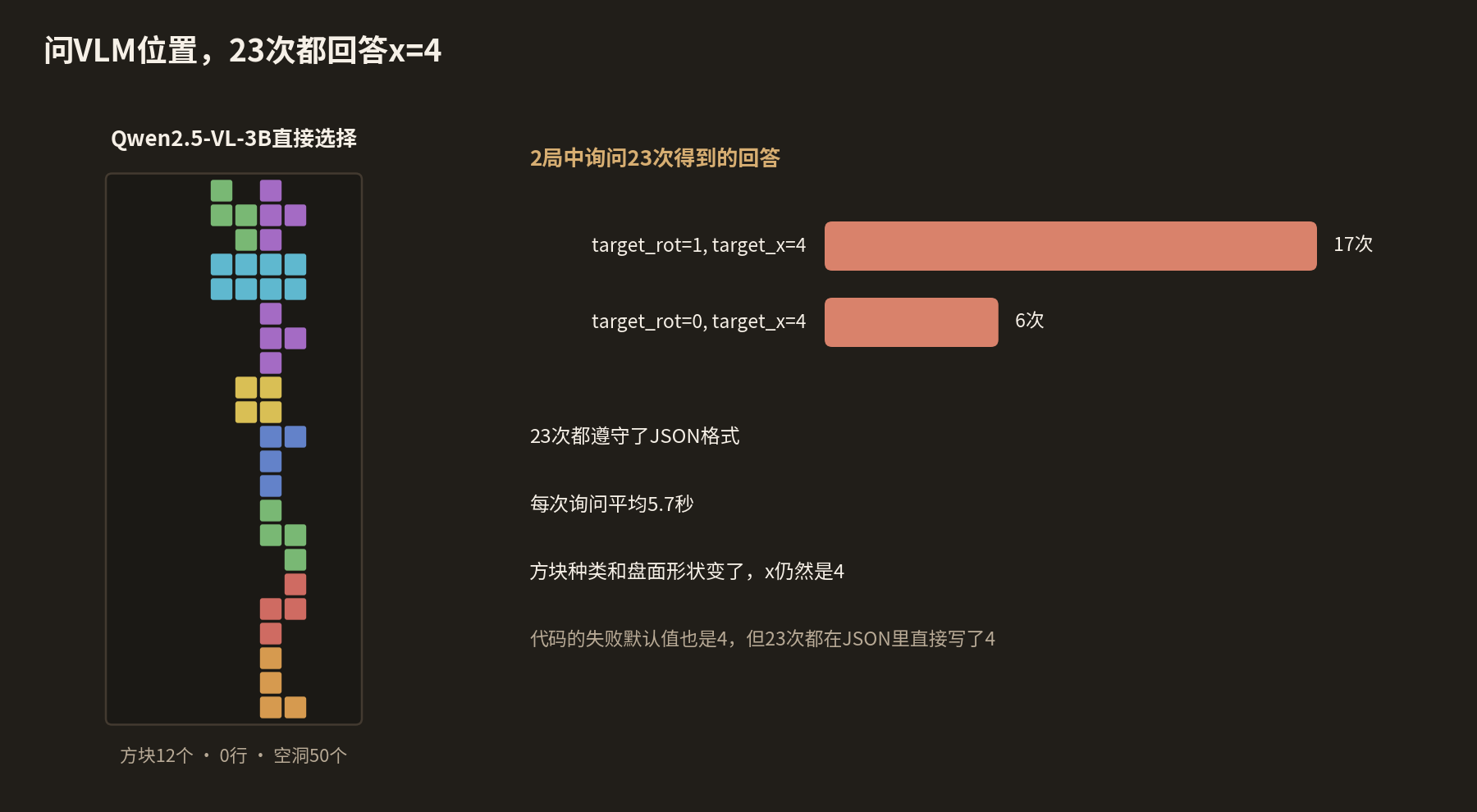
在同一个引擎上跑了 2 局。
- 方块 12 个和 11 个,0 行,空洞 50 个和 46 个
- 问了 23 次,23 次都遵守了 JSON 格式。
- target_x 23 次全是 4。只有旋转在 1(17 次)和 0(6 次)之间变化。
- 每次询问平均耗时 5.7 秒。
结果与宏 DQN 相同。它在中间堆起高塔,在 12 个方块左右结束。
为什么只出现 x=4
- 图像上没有列编号和网格线。要数 20 像素的格子才能知道是哪一列,这对 3B 模型来说很难。在五子棋中,VLM 只看图像选坐标时,也经常选到已有棋子的位置。
- 询问的那一刻,新方块还在隐藏行里,图像上看不到。方块只通过名称告诉它。
- 提示词把 target_x 说明为“列”,但引擎的 x 是 4×4 框的左边缘。即使选对了列,竖着的方块也会落在右边一两格的位置。第 3 篇中最左边一列的问题也依然存在。
我们不再让 VLM 编造坐标,而是改成由代码算出所有可以放置的位置,只让模型负责选择。
这一阶段的实际代码
这是发给 VLM 的问题。
vlm_macro_client.py
def get_macro_action(self, obs: np.ndarray, current_piece_name: str) -> tuple[int, int]:
    img = _grid_to_image(obs)
    prompt = (
        "You are an expert Tetris AI.\n"
        f"A new piece ({current_piece_name}) has just appeared at the top of the board.\n"
        "Look at the current board state and decide the best final resting position for this piece.\n"
        "Return your decision strictly as JSON with two keys:\n"
        '- "target_rot": an integer from 0 to 3 representing the number of clockwise rotations.\n'
        '- "target_x": an integer representing the target column (0-9 for a standard board, from left to right).\n'
        "Try to keep the stack flat, avoid creating holes, and clear lines if possible.\n"
        "Return ONLY the JSON string. Do not output anything else."
    )
新方块出现时询问一次,之后发送低层动作直到到达目标。
vlm_macro_client.py
if piece_index > current_piece_index:
    # New piece spawned. Ask VLM for macro action
    piece_name = name_piece(piece_type)
    print(f"\n--- New Piece Spawned: {piece_name} (Index: {piece_index}) ---")
    current_piece_index = piece_index
    target_rot, target_x = agent.get_macro_action(grid, piece_name)
    target_x = max(0, min(target_x, w - 1))
    print(f"VLM Decision -> Target Rot: {target_rot}, Target X: {target_x}")

# Translate target macro state to next micro action
micro = next_micro_for_target(piece_type, cur_rot, cur_x, target_rot, target_x)
下一篇是“5. 位置由代码计算,LLM 只负责选择”。
COMMENTS · CHAPTER 04
让 VLM 直接选择方块的位置 评论 0
还没有评论。阅读时有疑问或想补充的内容,欢迎留言。
发表评论前,请用 Google 开始并登记昵称和邮箱。
用 Google 开始