The role of the screen
The web screen does more than draw the board. It has to reduce accidental input, prevent duplicate moves while waiting for the server, and load saved games again. On a small phone in particular, it is safer not to confirm a stone with a single tap.
Step 1: Build a two-step move
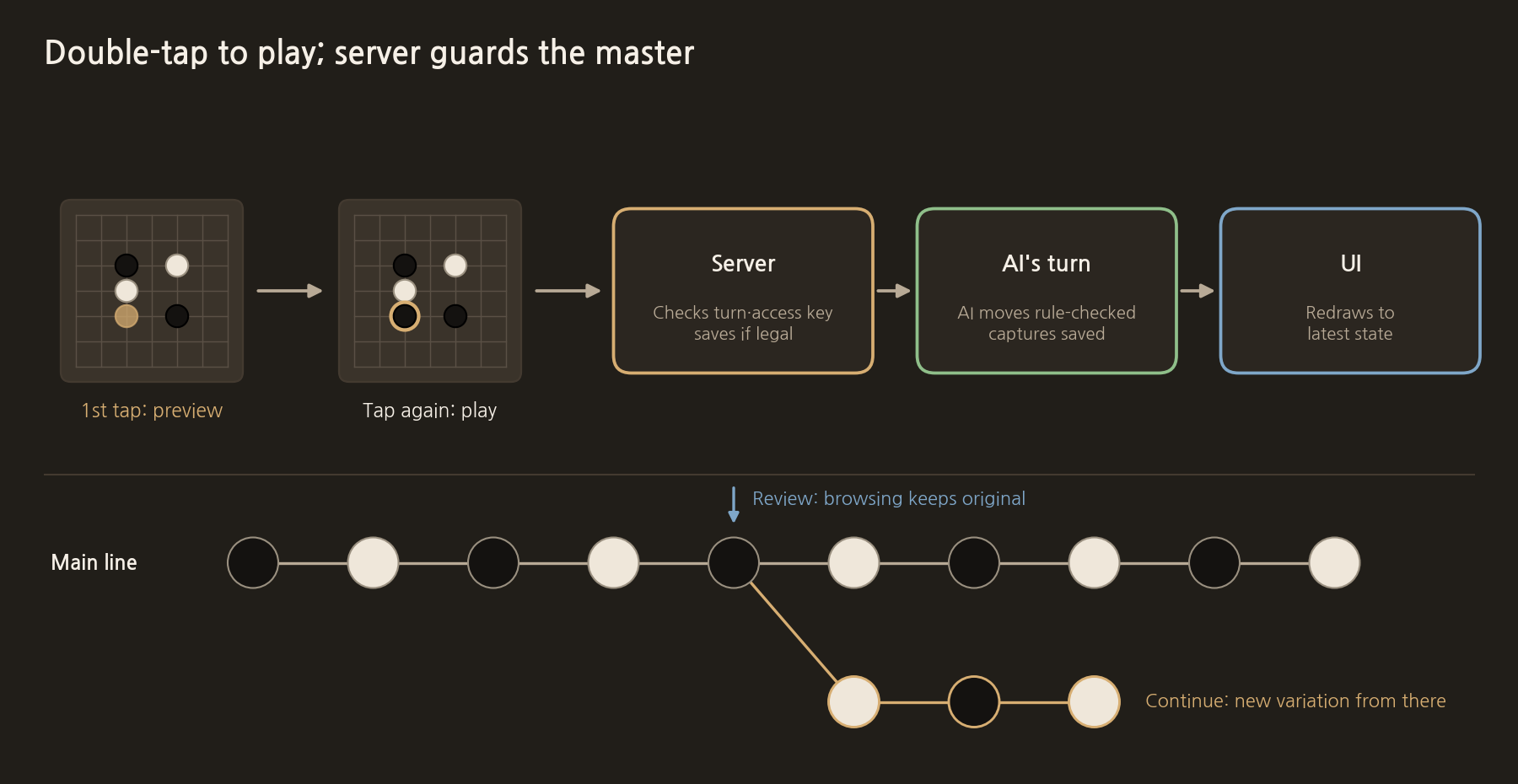
The first tap on an empty intersection shows only a gold preview stone. The move is sent to the server when the same point is tapped again or the "Play" button is pressed. Tapping a different point only moves the preview. Until the server responds, the button and board input are locked so the same move is not saved twice.
Step 2: Make the server the source of truth for the game state
When the server receives a move, it checks the game code and access key and verifies that it is that player's turn. Only moves that pass the rule engine are saved in a transaction, and then the AI's turn runs. Do not trust the board held by the browser; apply the new move to the server's latest state, so tampering and conflicts with stale screens are prevented.
- Validate and save the human's move.
- Ask the AI for the next move using the latest saved board.
- Check the AI's move with the rule engine.
- Save the AI's move and the capture results.
- Return the finished latest state to the screen.
Step 3: Keep review and continuing separate
Pressing the back and forward arrows during review must not change the real game's latest state. Only when "Continue from here" is chosen while viewing a past move do we create a new variation copied up to that point. Cutting off the existing sequence immediately could make the user lose the original record by mistake.
Step 4: Be honest about the end and the count
When both sides pass in a row or the user asks for a count, the empty territory, captured stones and White's komi can be calculated. But if dead stones on the board cannot be judged completely, the result must be labelled a "reference count". Explaining what was counted is more useful to the user than hiding the limits of automatic scoring.
Pre-release checklist
- Is the game in progress restored after a refresh?
- Is a move never saved twice on a slow network?
- Is it impossible to open someone else's game with a different access key?
- Does the original game stay unchanged while viewing past moves?
- Do the board and the move sequence stay consistent when an error occurs?
Connecting everything up to this point gives the first complete version. From here, failures found in real game logs, such as ladders, tiger's mouths and early passes, can be evaluated and fixed one kind at a time.
The actual code for this step
The review screen builds the board by replaying the saved sequence from the start up to the chosen move. The original sequence is never touched, so paging back and forth does not change the real game's latest state.
mariago-web/lib/board.ts
export type ReplayState = {
  board: Stone[];
  ko: Point | null;
  lastMove: Point | null;
  capB: number;
  capW: number;
  passStreak: number;
  toPlay: Stone;
};

/** 기보 0..upto 수까지 재현 (upto=0 이면 빈 판). */
export function replayMoves(
  moves: Array<{ color: 1 | 2; pass?: boolean; r?: number; c?: number }>,
  upto: number,
): ReplayState {
  let board = emptyBoard();
  let ko: Point | null = null;
  let lastMove: Point | null = null;
  let capB = 0;
  let capW = 0;
  let passStreak = 0;
  let toPlay: Stone = BLACK;
  const n = Math.max(0, Math.min(upto, moves.length));
  for (let i = 0; i < n; i++) {
    const m = moves[i];
    const who = m.color as Stone;
    if (m.pass) {
      passStreak += 1;
      lastMove = null;
    } else if (m.r != null && m.c != null) {
      const res = tryPlay(board, m.r, m.c, who, ko);
      if (res.ok) {
        board = res.board;
        ko = res.koPoint;
        lastMove = { r: m.r, c: m.c };
        if (who === BLACK) capB += res.captured;
        else capW += res.captured;
        passStreak = 0;
      }
    }
    toPlay = who === BLACK ? WHITE : BLACK;
  }
  return { board, ko, lastMove, capB, capW, passStreak, toPlay };
}
Model used: Qwen3-VL-8B-Instruct + LoRA adapter (lora_mix_qwen_r5). The full source and a description of the model are in the post "8. The full source code and the models used".
COMMENTS · CHAPTER 06
Connecting web play and game record saving 0 comments
No comments yet. Leave a question or anything you would like to add.
To post a comment, continue with Google and register a nickname and email address.
Continue with Google