Why we added the solve loop
To apply the solving rules to the heuristic, we introduced something called the solve loop. The tile sliding puzzle (TSP from here on) is not originally a puzzle about lining up numbers. The first board with numbers is a practice board, like a tutorial; after that, pictures appear on the board, and it becomes an image-memory game where you remember the picture. Yet an AI struggles even to pass the first tutorial. So first we taught the heuristic the solving process.
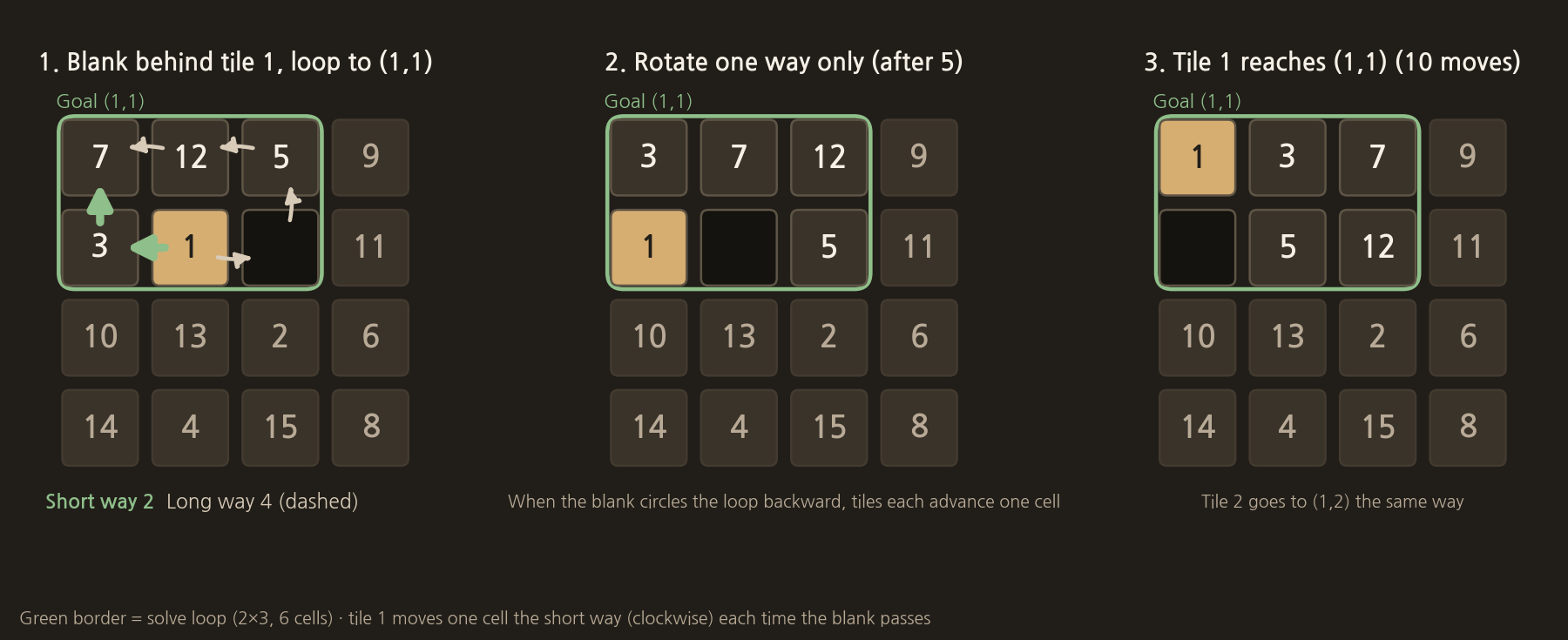
Tiles 1 and 2: rotate in one direction only
The solving process is very simple. Say we want to move 1 to the first cell. Put the empty cell right behind 1. Then build a loop that includes the target coordinate (1,1). If you keep rotating the loop in one direction only, 1 eventually lands on (1,1). Then place 2 the same way, and (1,2) is done.
Tiles 3 and 4: line them up in order and place them together
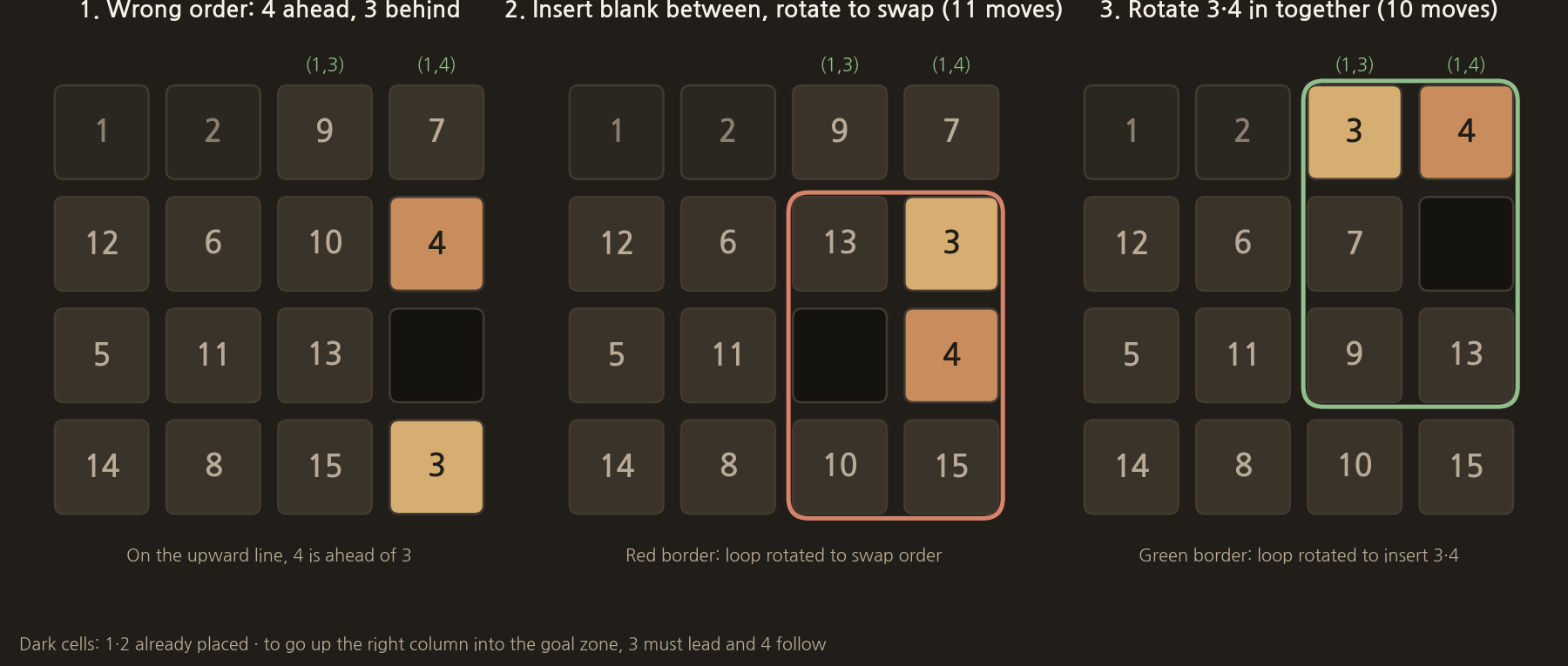
The next part is the problem. Now 3 and 4 have to be placed at the same time. If the numbers enter the target zone moving to the right, 3 must be in front and 4 behind; if they enter moving to the left, 4 must be in front and 3 behind, and then the loop is turned to bring them into the target zone.
If 3 and 4 are in the wrong order, first put the empty cell between the two numbers and turn the loop. That swaps the order of 3 and 4. Then turn the loop up to the coordinates of 3 and 4, and the first row 1, 2, 3, 4 is complete. After that, 5, 6, 7 and 8 are easy as well.
Tiles 9 to 15: place them all at once
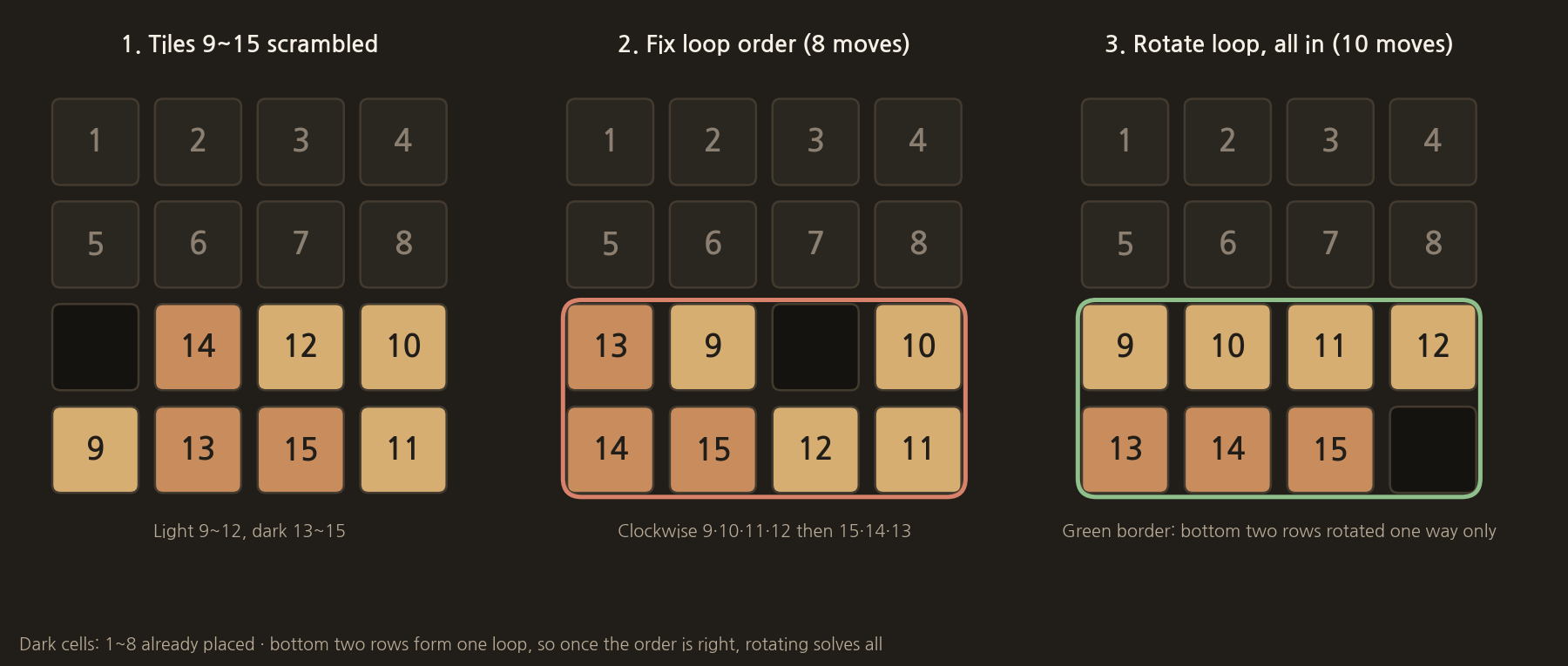
After that, 9 to 15 have to be solved so that they all go into their coordinates in one go. So 9 to 12 are arranged in order, and then the loop has to be built with 15, 14 and 13 in reverse order to reach the answer.
Results after the fix
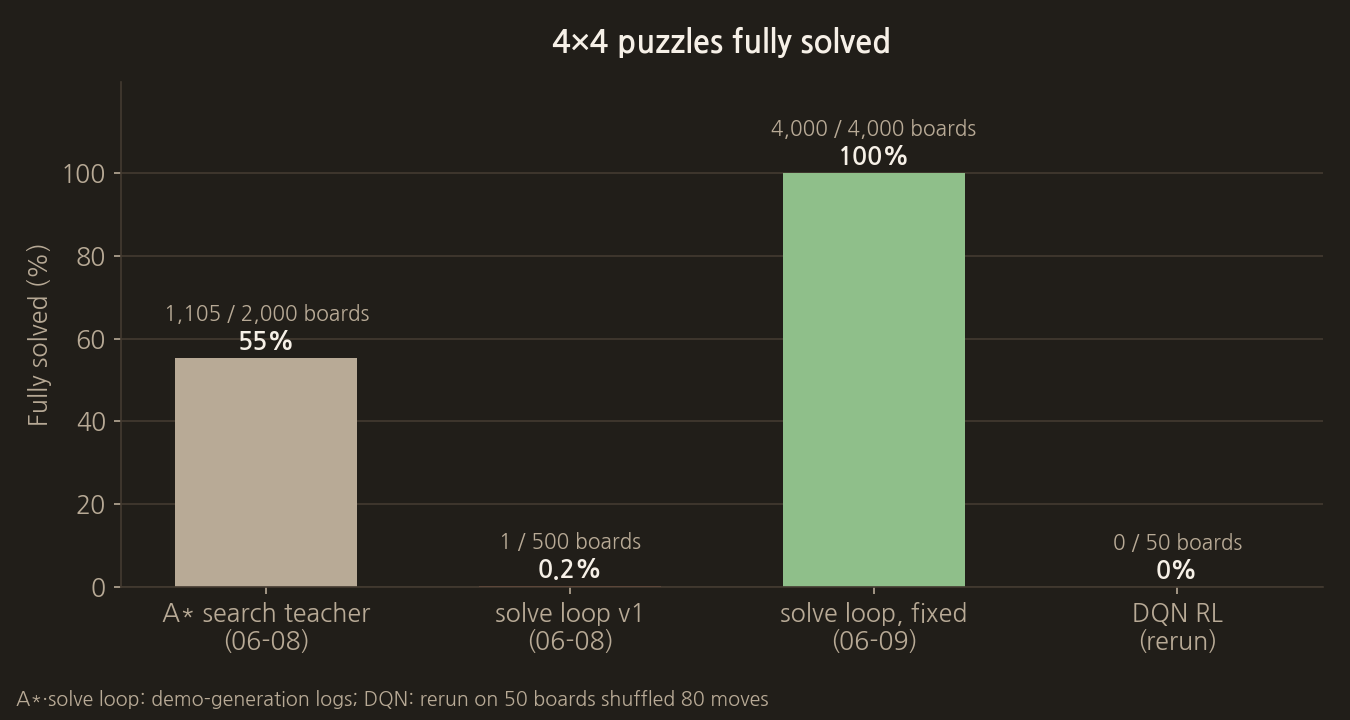
After that, I left the hard work to a coding AI and confirmed with tests that the heuristic behaved correctly. The first solve loop solved only 1 of 500 boards. The version fixed the next day solved all 4,000 boards, taking 91 moves per board on average. Around the same time, a teacher built with A* search solved 1,105 of 2,000 boards within its search limit.
By stage, placing 3 and 4 together was the longest at 22.5 moves on average. Since the order has to be swapped and the two turned in together, it takes nearly three times as long as tile 1 or tile 2.
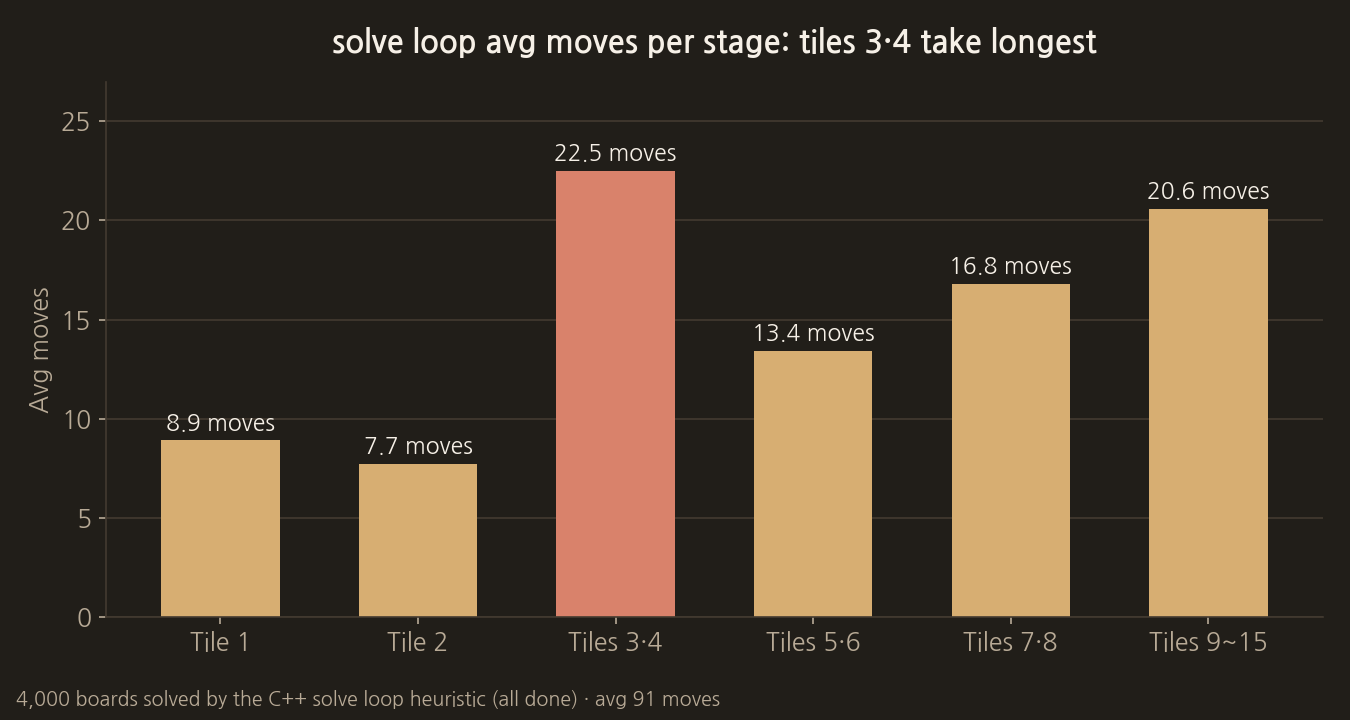
Through testing, we found that the heuristic also quickly solves the later boards with pictures.
Next: training the AI
Then we started training the AI. The AI, which often fell into infinite loops at first, could finish learning quickly as training went on, but DQN could not solve this problem. With imitation learning that copied the heuristic's solutions, the share of moves matching the heuristic rose from 32% to 63% over 40 iterations. The results of running the trained models again are summarised in post 4.
The actual code for this step
This is the loop that places tile 1. Once the empty cell and tile 1 are both on the loop, the rotation direction is decided once and locked, and the loop is turned one cell at a time in that direction only until 1 enters (1,1).
src/puzzle_planner.cpp
    const bool use_snake = (target == 1) && tile1_snake_applicable(s);
    const bool snake_rotate_ready =
        use_snake && is_on_tile1_snake(s.blank_r, s.blank_c) && tile_position_on_snake(1, s);
    if (snake_rotate_ready && loop_ctx && loop_ctx->locked_dir) {
        if (!loop_ctx->locked_dir->has_value() || (loop_ctx->locked_target
                                                   && *loop_ctx->locked_target != target)) {
            lock_loop_dir_if_needed(loop_ctx,
                                    target,
                                    pick_best_snake_dir(s, target),
                                    "snake until tile1→A1");
        }
        const SnakeLoopDirection dir = loop_ctx->locked_dir->value();
        const auto chunk = snake_directed_one_step(s, target, dir);
        if (!chunk || chunk->empty()) {
            out.note = std::string("snake_") + snake_loop_direction_label(dir) + "_fail";
            return out;
        }
        const int a = (*chunk)[0];
        const TileCellMove mv = make_tile_move(s, static_cast<PuzzleAction>(a));
        if (!apply_action_on_tile1_snake(s, static_cast<PuzzleAction>(a), target)) {
            out.note = std::string("snake_") + snake_loop_direction_label(dir) + "_apply_fail";
            return out;
        }
        out.moves.push_back(mv);
        out.reached_goal = tile_at_goal(target, s);
        out.note = std::string("snake_") + snake_loop_direction_label(dir);
        return out;
    }
The full source and the models used are in the post "4. The full source code and the models used".
COMMENTS · CHAPTER 02
Fixing the sliding puzzle heuristic 0 comments
No comments yet. Leave a question or anything you would like to add.
To post a comment, continue with Google and register a nickname and email address.
Continue with Google