What this post builds
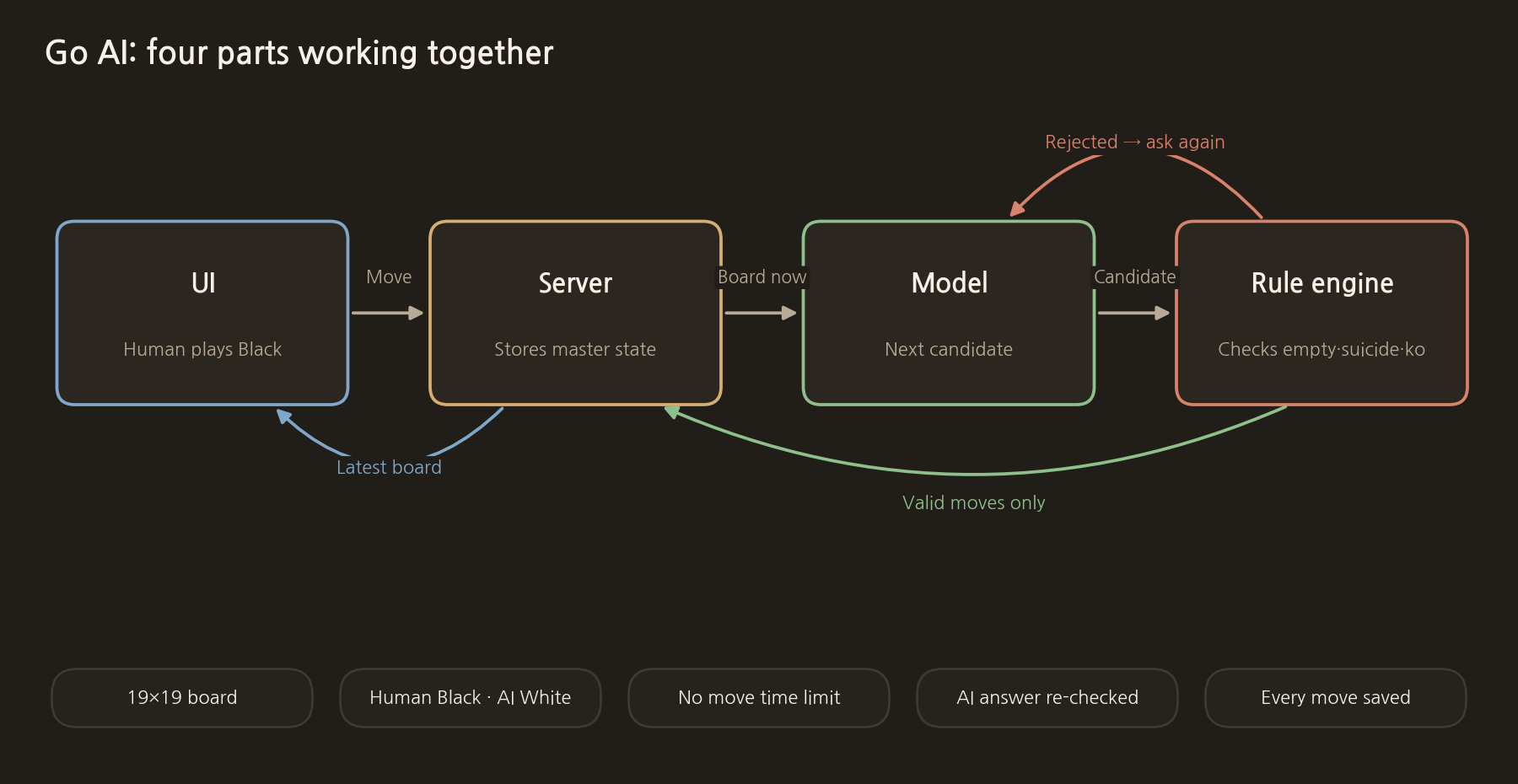
The result of the first step is not a flashy model but a one-page design sheet. A Go AI needs a model that recommends moves, an engine that judges the rules, a server that saves games and a screen where the user places stones, all working together. If you train the model before drawing these boundaries, it is easy to mistake illegal moves and save errors for model performance problems.
- Use a standard 19×19 board.
- The human plays Black and the AI plays White.
- There is no time limit on the human's moves.
- The rule engine checks the model's answer again.
- The board and move order are saved on the server after every move.
Step 1: Separate the model from the rule engine
The model's job ends at looking at the current board and proposing a candidate coordinate for the next move. Whether that point is empty, whether it is suicide, or whether it is a ko that repeats the previous board is decided by the rule engine. If the model answers a point that already has a stone, the candidate is rejected and the model is asked again. If the retry also fails, we do not substitute a random move; we log the error.
This separation matters for reproducibility. When something goes wrong on a given board, you can check separately whether the model chose badly or the rule code was wrong. The rules are pinned down with tests, and the model stays a replaceable part.
Step 2: Define the game state as one object
The minimal state holds the 19×19 board, whose turn it is, the number of captured stones, the ko-forbidden point, the full move order and the time of the last save. Do not try to rebuild the state from the screen; the server must keep the original. To continue the same game after reopening the browser, you also need a game code and an access key.
Step 3: Write down when it is done
The completion criterion for the first version is not "a strong AI". It is enough that a human can play legal moves, the AI's illegal answers are rejected, the move order survives a refresh, and two passes in a row end the game. Only after passing this bar should you improve the training data and playing strength, so that you can trace the cause of each problem one at a time.
The next post explains how to split one SGF game record into training inputs and target coordinates.
The actual code for this step
MariaGO's web game saves the "game state as one object" from step 2 on the server as the GameRow type below. The board, the next player, the ko point, captured stones, the number of consecutive passes and the full move order go into one row, along with an access key for continuing on another device.
mariago-web/lib/gameTypes.ts
export type MoveRec = {
  ply: number;
  color: 1 | 2;
  pass?: boolean;
  r?: number;
  c?: number;
};

export type GameWinner = "black" | "white" | "draw";

export type GameRow = {
  code: string;
  guest_id: string;
  /** 비공개 키 — 다른 기기 이어두기용. 남에게 코드만 공유하면 안 됨 */
  access_key: string;
  board: number[];
  to_play: number;
  ko: { r: number; c: number } | null;
  last_move: { r: number; c: number } | null;
  move_no: number;
  cap_b: number;
  cap_w: number;
  pass_streak: number;
  epoch: number;
  started: boolean;
  status: "playing" | "ended";
  end_text: string | null;
  winner: GameWinner | null;
  moves: MoveRec[];
  created_at: string;
  updated_at: string;
};
Model used: Qwen3-VL-8B-Instruct + LoRA adapter (lora_mix_qwen_r5). The full source and a description of the model are in the post "8. The full source code and the models used".
COMMENTS · CHAPTER 01
Deciding the scope of the Go AI first 0 comments
No comments yet. Leave a question or anything you would like to add.
To post a comment, continue with Google and register a nickname and email address.
Continue with Google