Why it failed at first
The early model answered coordinates in the lower right of the board far too often. It looked like a shortage of game records, but the real cause was the input format. The training data used an aligned board with numbers attached, while the live server sent a board with different spacing. In particular, from the point where column numbers became two digits, the model read stone positions one point off.
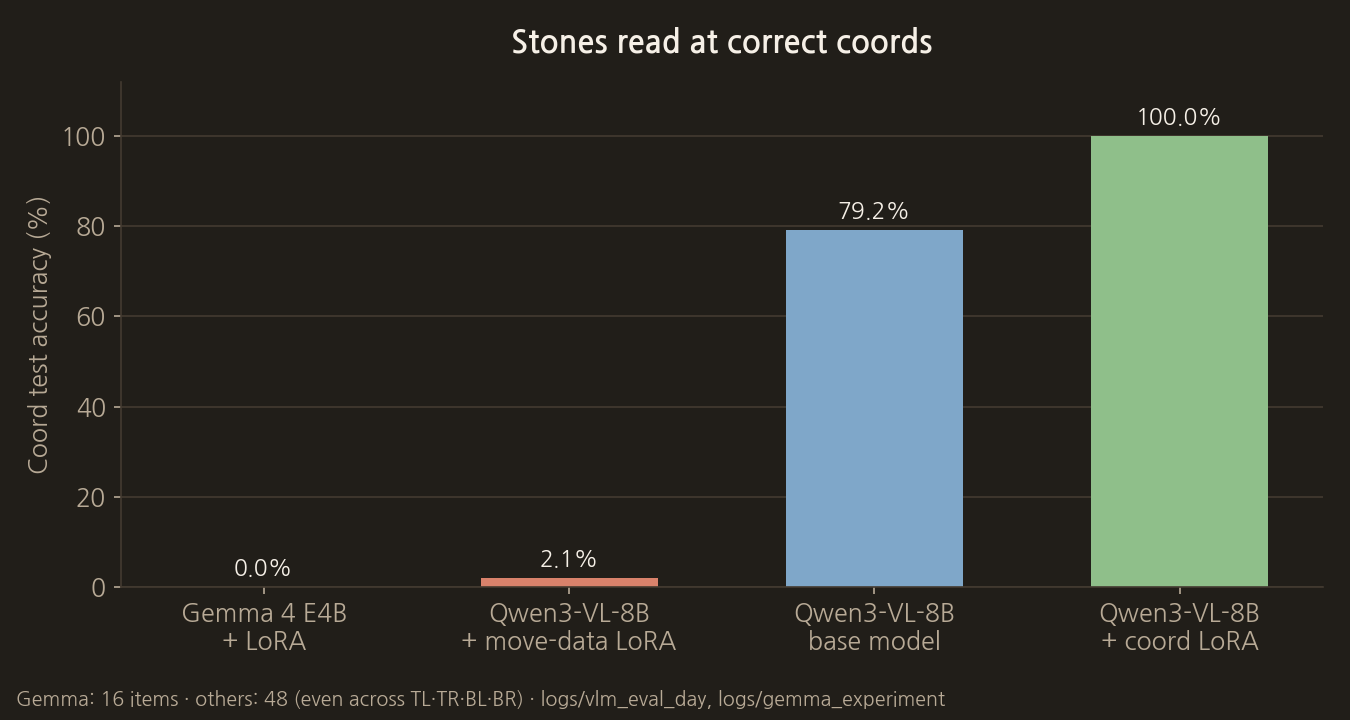
The first model, Gemma 4 E4B with LoRA, got none of the 16 coordinate test questions right. Even after switching to Qwen3-VL-8B, an adapter trained briefly on only 400 move examples dropped to 2.1%. So we built a coordinate-only adapter first and trained moves on top of it.
Step 1: Fix the coordinate width
Rows and columns are written as two digits, 00, 01, 02, rather than 0, 1, 2. Empty points, black stones and white stones are each fixed to one character, and the number of separating spaces never changes. Even if the function that builds training data and the function that builds live game requests are separate, it is safest for them to share a single final string generator.
- Print the column headers from 00 to 18.
- Put a number from 00 to 18 in front of each row as well.
- Make the empty, black and white symbols the same width.
- Write the current turn and forbidden points in a fixed place below the board.
Step 2: Pass the coordinate test first
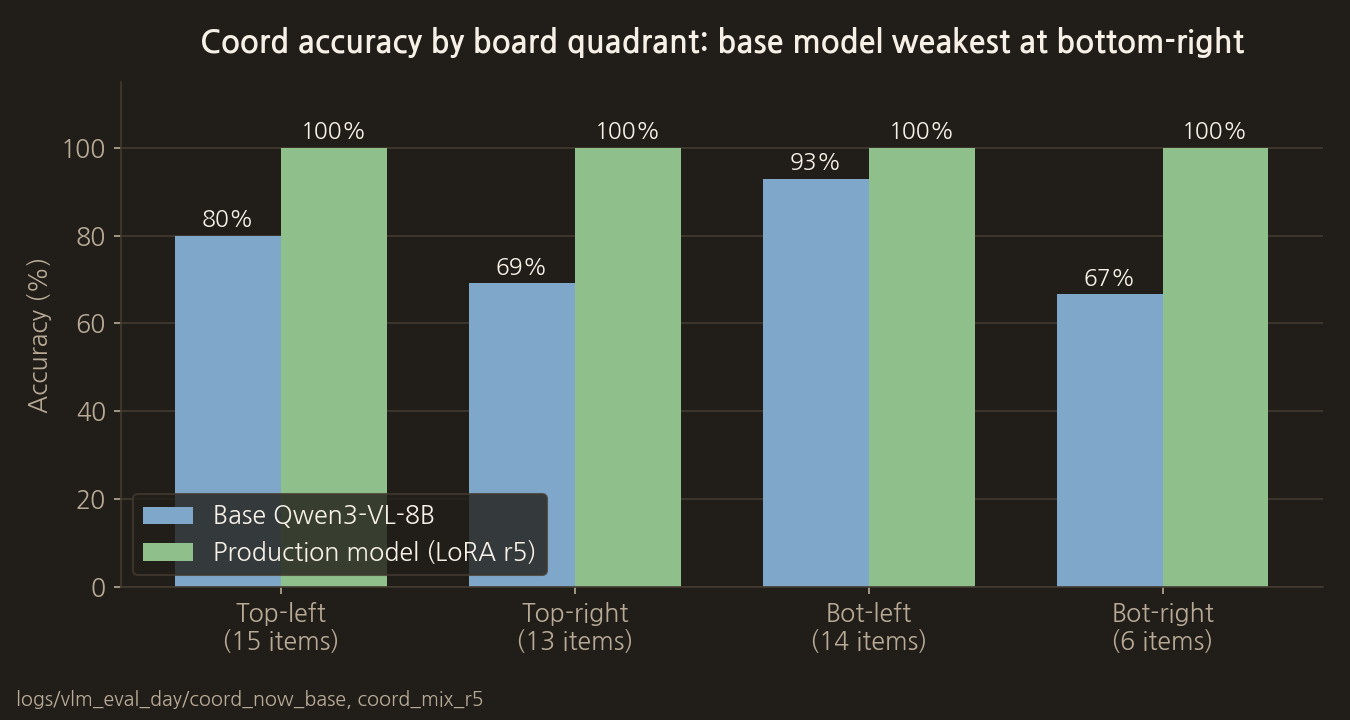
Before training for strength, place a stone on a random point and have the model answer its coordinate. Do not test only the centre; make the same number of questions in each of the four areas: top left, top right, bottom left and bottom right. Even with high overall accuracy, if only the lower right is weak, real games will show a directional bias.
Even the base Qwen3-VL-8B had its lowest accuracy, 66.7%, in the lower right of the four areas.
Run the coordinate test again whenever you retrain the model or change the prompt. Save the direction of wrong answers along with the accuracy. Depending on whether it keeps missing one point to the right or swaps rows and columns, you can check the input alignment and the output parser separately.
Step 3: Narrow the output format
When the model answers with a long explanation, the coordinate parser becomes unstable. Normal output is limited to a single coordinate or PASS. Quietly using only the first coordinate when an explanation is attached can hide wrong moves, so it is logged as a format error and retried only a fixed number of times.
Until coordinate accuracy is secured, feeding in more game records may only reinforce the habit of misreading.
The actual code for this step
This is the board string generator that makes the column headers, row numbers and stone symbols all two characters wide. Both training data generation and the live move recommendation server use this function, so the input formats never drift apart.
vlm_server/dataset_baduk.py
def board_text_aligned(cells: bytes, size: int = BOARD_SIZE) -> str:
    """v3 권장: 열·행·셀이 모두 두 글자 토큰으로 정렬.

    셀 기호는 **왼쪽 정렬** (``X `` / ``. ``). 오른쪽 정렬(`` X``)은
    모델이 열을 한 칸 왼쪽(col-1)으로 읽는 오차를 유발했다.
    """
    col_header = "   " + " ".join(f"{c:02d}" for c in range(size))
    lines: List[str] = [col_header]
    for r in range(size):
        cells_s: List[str] = []
        for c in range(size):
            v = cells[r * size + c]
            ch = "." if v == 0 else ("X" if v == 1 else "O")
            cells_s.append(f"{ch:<2}")
        lines.append(f"{r:02d} " + " ".join(cells_s))
    return "\n".join(lines)
The model's target output is limited to one line of JSON containing only one coordinate or a pass.
vlm_server/dataset_baduk.py
def assistant_text(point: Optional[Tuple[int, int]]) -> str:
    if point is None:
        return '{"pass": true}'
    r, c = point
    return f'{{"row": {r}, "col": {c}}}'
Model used: Qwen3-VL-8B-Instruct + LoRA adapter (lora_mix_qwen_r5). The full source and a description of the model are in the post "8. The full source code and the models used".
COMMENTS · CHAPTER 03
Turning a 19×19 board into input the AI can read 0 comments
No comments yet. Leave a question or anything you would like to add.
To post a comment, continue with Google and register a nickname and email address.
Continue with Google